
Modern WordPress PHP Coding Standards
January 9, 2026
Modern WordPress PHP Coding Standards
In this post, I want to dive into the world of WordPress coding standards. Before we do deep dives into advanced development in future posts, we first need to establish how we are actually going to write the code.
So, what are coding standards, and why do you even need them?
According to official WordPress documentation, coding standards are essentially a baseline for collaboration. They serve three main purposes:
- Helping avoid common coding errors.
- Improving code readability.
- Simplifying the modification process.
The ultimate goal is to ensure that every file within a project appears as though it were created by a single person. In other words, coding standards are a form of project governance.
Navigating Developer Opinions
Developers are a group of people known for having very high opinions on how things should be done. Because you can technically write code any way you like, these standards allow contributors with different styles to accept a common baseline—willingly or unwillingly—to move the project forward.
In open-source projects, these rules are typically decided by the original founders, the community, or company leadership.
A Brief History of WordPress Coding Standards
To move forward in an informed way, it is important to understand where these standards came from.
WordPress is an old project that came into existence when PHP was still “finding its feet”. For context, when WordPress was being created, things we take for granted today—like exceptions—weren’t even part of the PHP standard yet.
The Timeline Gap
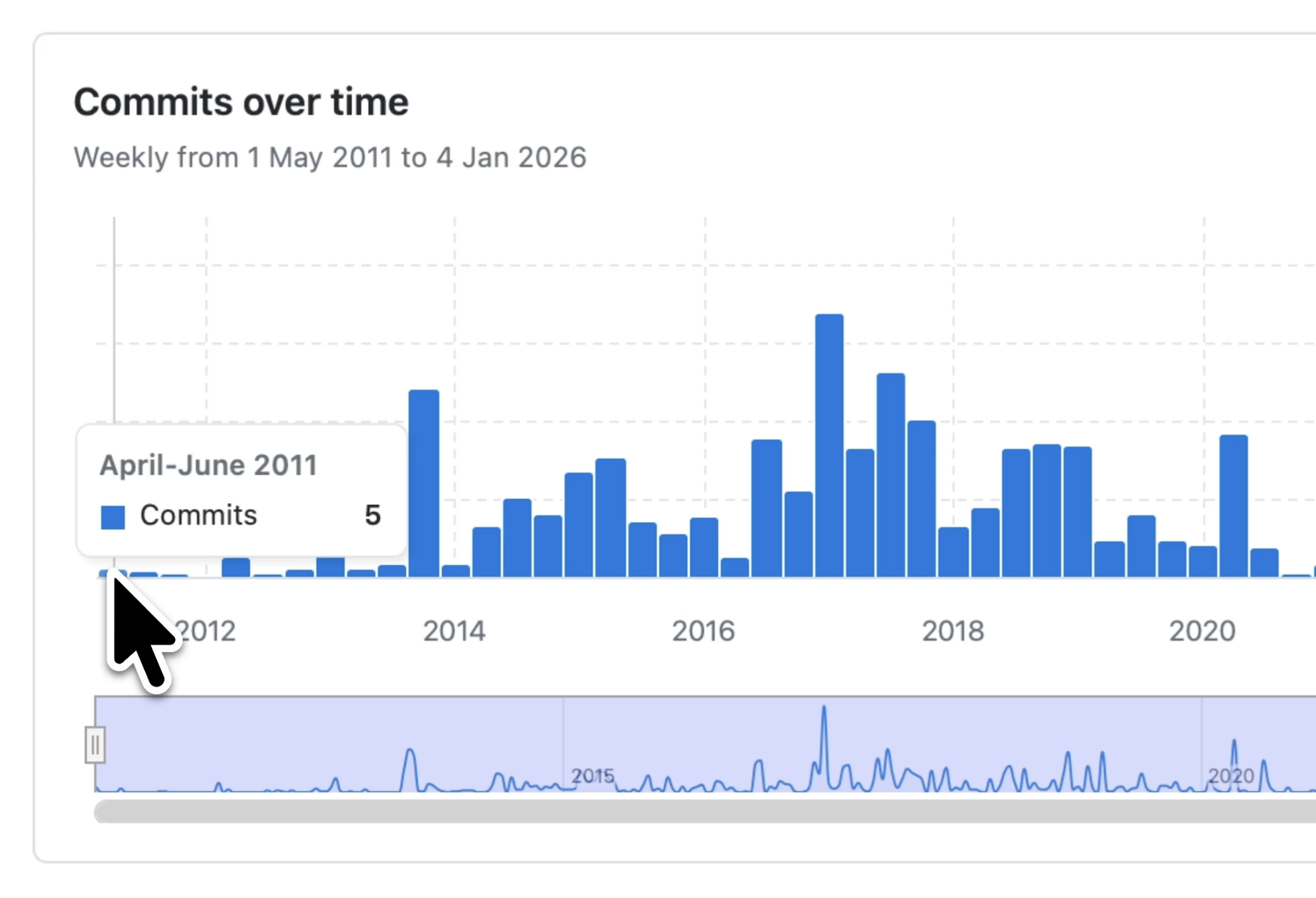
Looking at the WordPress Coding Standards GitHub repository, the first commits appeared between April and June of 2011. While the standards were formalized then, automated tools to detect and fix them didn’t arrive until years later.
The PSR Conflict The PHP Standard Recommendation (PSR)—specifically PSR-1—was adopted in 2012, shortly after WordPress had already committed to its own standards.
Unfortunately, WordPress “missed the boat” on PSR. The two standards are wildly different, specifically regarding readability, which is highly subjective. For example, many engineers find PSR easier to follow, while WordPress emphasizes heavy inline documentation.
The “Modern” vs. “Improved” Approach
As PHP developers, we now have a choice. If you are contributing to WordPress Core, you must follow their standards. However, if you are working on your own plugin or a project that won’t be hosted on the official WordPress.org repository, you can choose your own path.
I often hesitate to use the word “modern,” but in this context, it refers to bringing improved PHP practices into the WordPress ecosystem.
Inspiration from Laravel
In the PHP community, Laravel is a major player. I’m a huge fan of Laravel Pint, a tool that works out of the box to fix code according to Laravel’s standards (a subset of PSR-12) automatically.
I wanted something similar for WordPress—a tool that “just works”.
Introducing the Aysnc WordPress Coding Standards
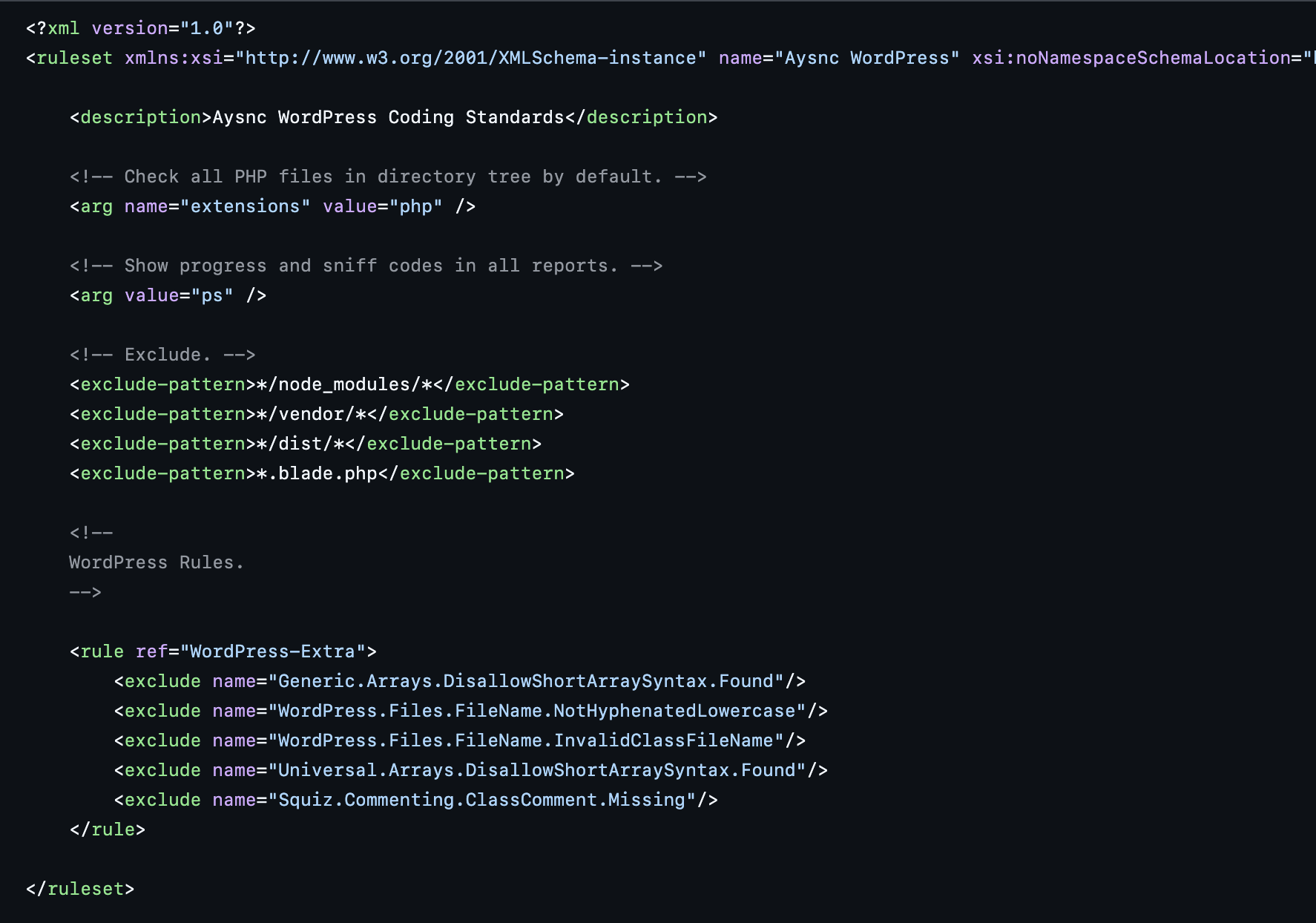
I’ve gone ahead and created a custom rule set: aysnc-labs/wordpress-phpcs. It is essentially the WordPress standards with a handful of exclusions to make it compatible with modern development.
Key Adjustments for Modern PHP
To make the standards work with “improved” practices, I removed rules that conflict with essential tools like autoloading.
- Short Array Syntax: Enabled for cleaner code.
- File Naming: Removed the requirement for hyphenated lowercase filenames, which often breaks PSR-style autoloading.
Autoloading is a game-changer in PHP, yet WordPress remains behind on this front. If you are working on a new codebase and using classes, you absolutely should be using autoloading. My goal is to find a middle ground: using the spirit of WordPress standards while enabling modern PHP practices.
Coding Standards in the Age of AI
We also have to consider the relevance of these standards now that AI is writing so much of our code.
LLMs (Large Language Models) are often trained on a mixture of WordPress “old-school” styles and Laravel styles. By default, the code they generate can be a bit sloppy or inconsistent.
You don’t want to spend your time manually fixing AI-generated code to fit WordPress standards. You want a “magic wand” that converts AI code into production-ready code instantly.
That “magic wand” is the PHPCS Fixer, which I’ll be covering in detail in my next post. It saves massive amounts of time by automatically handling:
- Aligning arrows.
- Adding spaces within parentheses.
- General formatting that used to be a manual chore.
What’s Next?
This post is just a primer. In the next video and post, I’ll show you how the PHPCS Fixer works as a foundation for enterprise-level engineering.
Would you like me to notify you when the deep dive into the PHPCS Fixer is available, or shall we start looking at how to implement the wordpress-phpcs repo into your current project?